See what's open, unused and at risk in your Microsoft tenant.
Praxisis Tenant Governance & Health Check finds oversharing, risky access, unused licences and settings that need attention across Microsoft 365, Teams, Entra ID, Copilot, Power Platform, Dynamics 365 and Azure. Your own staff run the checks with a toolkit. We set up and coach you through. Your data stays in your tenant: the AI that coaches you only ever sees codes, never names.
What if you could...
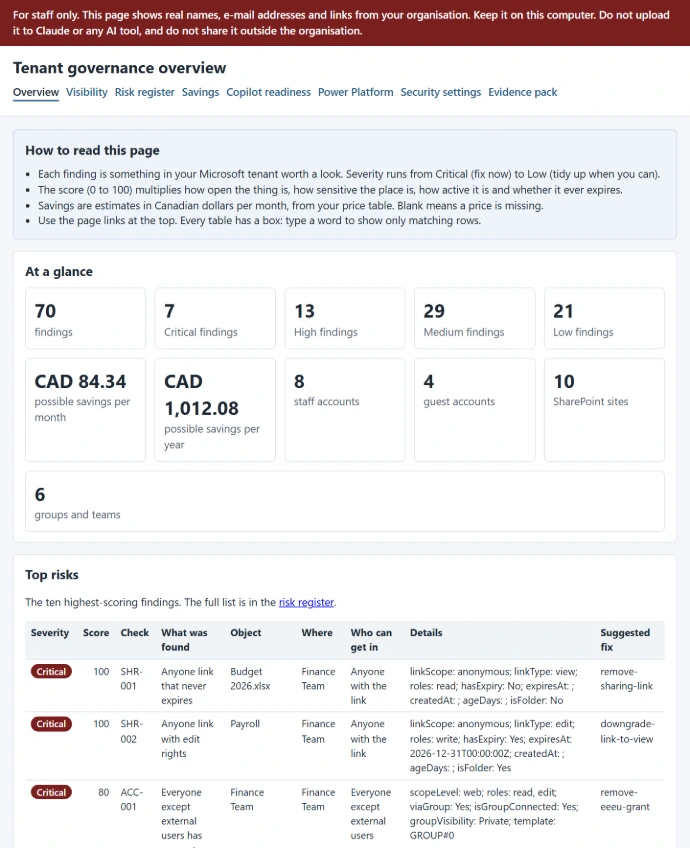
✅ See your whole Microsoft tenant in one place — sites, teams, guests, licences, apps, flows and agents, with your Azure spend next to them
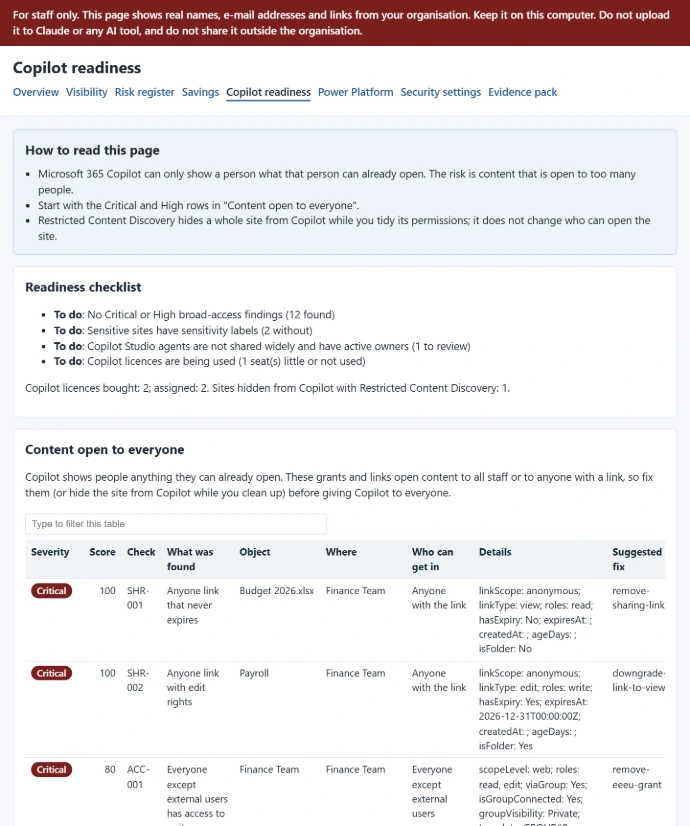
✅ Know which files anyone with a link can open — and which sites everyone in your organization can reach
✅ Find the licences you pay for and nobody uses — priced in Canadian dollars, from your own price list
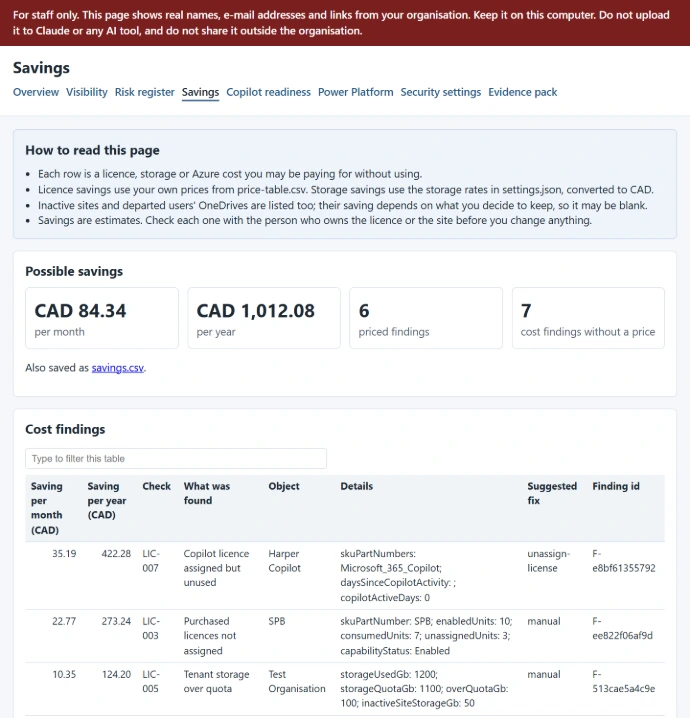
✅ Get ready for Copilot — fix what it could show to the wrong person before you switch it on
✅ Fix problems in bulk, safely — from a list you approve, tried first as a dry run, with a record of every change
So that you can tell your board and privacy officer what is open, what it costs and what you did about it, with the evidence to back it.
This fits you if you are...
🏢 A nonprofit or small organization on Microsoft 365 — roughly 20 to 300 staff, with or without Dynamics 365 or Power Apps
🔗 Sharing files the easy way for years — "anyone with the link", guests from past projects, teams nobody owns
🤖 Thinking about Copilot — and unsure what it could surface from old folders
💸 Paying for licences you can't account for — people who have left, trials that turned into bills
📋 Asked for evidence — by a board, funder, auditor or insurer, or under Alberta PIPA, Quebec Law 25 or PIPEDA
🙋 Short on IT time — a small team, or an outside provider who handles the day-to-day but not governance
If two or more of these describe you, keep reading. If none of them do, honestly — this isn't for you, and we'll tell you that on the call.
Your data stays yours.
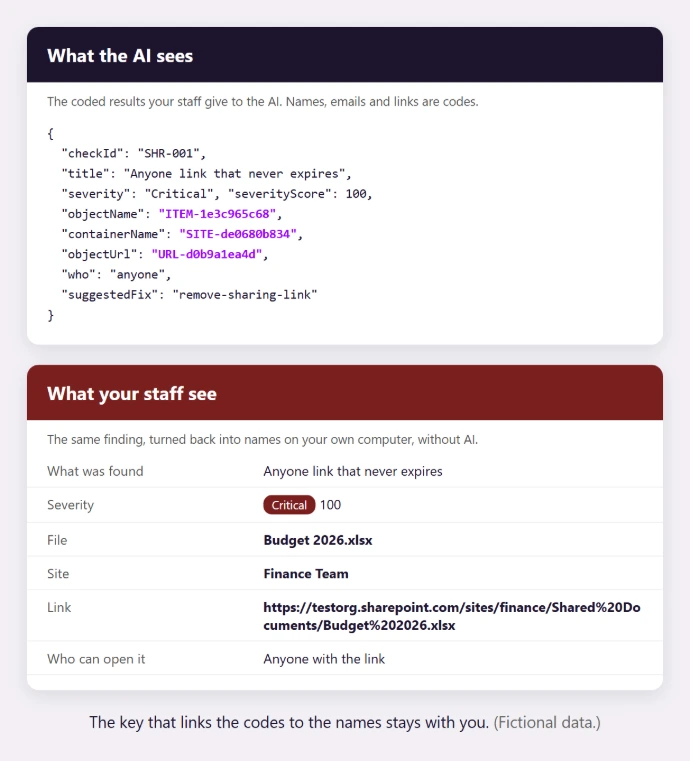
No outside tool connects to your tenant, and no AI sees a name, an email address or a link. Every check runs in five steps:
1️⃣ Collect — your staff run read-only scripts on their own computer
2️⃣ Swap names for codes — names, emails, links and ids become codes, using a key only you hold; a check stops everything if anything real is left
3️⃣ Get coaching — only the coded results go to the AI, which explains the findings, suggests what to fix first and drafts your wiki pages
4️⃣ Turn codes back into names — on your own computer, without AI, so your staff see exactly which file or site it is
5️⃣ Fix, with approval — a change list you approve, a dry run first, then the fix, with a tamper-evident record of every change
So that you get the help of AI without handing it your organization's personal information.
What the Tenant Governance & Health Check is.
🔎 A health check of your whole Microsoft tenant
Not just SharePoint. Not a dashboard you rent.
- Visibility — sites, teams, groups, OneDrives, users, guests, licences, apps, flows, agents and Azure resources, with monthly spend
- Risks ranked — more than 40 checks, each with a severity score and the reason: open links, broad access, ownerless teams, old guests
- Savings — unused and misassigned licences, inactive sites and storage, in Canadian dollars
- Copilot readiness — what Copilot could surface, sensitive sites without a label, agents shared too widely
- Power Platform and Dynamics 365 — environments without data policies, apps and flows whose owner has left, Dataverse auditing
- Security settings — a pass with free, well-known scanners, turned into the same ranked findings
🧰 A toolkit your team owns
Not a subscription. Not another vendor with admin rights.
- Your staff run it — step-by-step guides written for your roles, every month or quarter
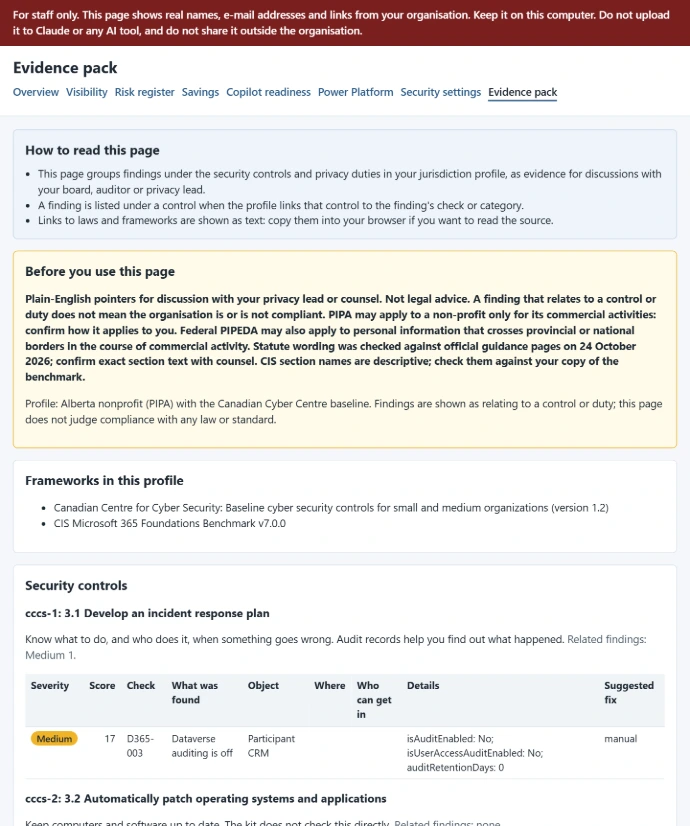
- Evidence pack — findings grouped by the security controls and privacy duties that apply to you
- Fixes you approve — bulk fixes from an approved list, dry run first, with an audit log
- Policies that propose, never act — Microsoft's own policies set up, plus scheduled checks that suggest changes for your approval
- A governance wiki — on your SharePoint; it builds up what you learn with every run
- AI coaching on codes only — explanations, priorities and next steps, without a single name
Services
Choose the level of help you need.
Every level is run by your own staff, with Praxisis setting up, coaching and checking. Fixed scope, agreed up front. No software subscription.
One-time
Health Check
A first, read-only look at your whole Microsoft tenant, run by your staff with us beside them.
- ✔️ The read-only toolkit set up in your tenant
- ✔️ One coached run across Microsoft 365, Teams, Power Platform and Azure
- ✔️ Risks ranked, savings in Canadian dollars, Copilot readiness
- ✔️ A security-settings pass and an evidence pack
- ✔️ A prioritised action list for your team
Per engagement
Build + Guide
The toolkit adapted to your organization and handed over, so your team runs it every month or quarter.
- ✔️ Everything in the Health Check
- ✔️ Step-by-step guides and a governance wiki for your roles
- ✔️ Policies set up, with scheduled checks that propose changes
- ✔️ Your first approved fixes, with a dry run and an audit log
- ✔️ Training, then your first and second periodic runs, coached
Monthly or quarterly
Maintain
Keep the toolkit current as Microsoft changes, with a second pair of eyes on every cycle.
- ✔️ Script and check updates as Microsoft changes its services
- ✔️ A coaching review of each cycle's results
- ✔️ Guide and wiki updates
- ✔️ Help when a finding or a fix is unclear
Per request
Extra help
For the moments in between.
- ✔️ An extra coached run, for example before an audit or a board meeting
- ✔️ A walk-through of the evidence pack for your board, funder or privacy officer
- ✔️ Adding a new site, environment or Azure subscription to the checks
- ✔️ A coached fix window for a larger clean-up
Compare the levels
| What you get | Health Check | Build + Guide | Maintain |
|---|---|---|---|
| Read-only check of Microsoft 365, Teams, Entra ID, Copilot, Power Platform, Dynamics 365 and Azure | ✔️ | ✔️ | ✔️ every cycle |
| Risks ranked by severity, with the reasons | ✔️ | ✔️ | ✔️ |
| Licence and spend savings in Canadian dollars | ✔️ | ✔️ | ✔️ |
| Copilot readiness and a security-settings pass | ✔️ | ✔️ | ✔️ |
| Evidence pack for the privacy law that applies to you | ✔️ | ✔️ | ✔️ |
| AI coaching on coded results only | ✔️ | ✔️ | ✔️ |
| Coached runs | One | The initial run, then the first and second periodic runs | A review of each cycle |
| Toolkit adapted to your organization | — | ✔️ | Kept current |
| Step-by-step guides and governance wiki for your roles | — | ✔️ | Updated |
| Approved bulk fixes with an audit log | — | ✔️ | Coached when needed |
| Policies and scheduled checks that propose changes | — | ✔️ | Reviewed |
| Training and handover | A walk-through of the results | ✔️ | Refreshers for new staff |
Maintain follows Build + Guide. Extra help can be added to any level.
What you provide: Microsoft 365 with full administrator access (some resellers block it; we check this on the first call), a few hours of staff time per cycle, and your own paid Claude plan for the coaching step.
That's not all — included at every level:
🔐 Least access — a read-only app for the checks; a separate fix app that exists only for a fix window and is removed the same day
🧾 Plain-English reports on your computer — every table can be filtered and opened in Excel
🧭 Honest about limits — we tell you what the toolkit doesn't check, such as devices and patching, so nothing is assumed covered
⚖️ Pointers, not verdicts — the evidence pack supports the conversation with your privacy lead or counsel; it is not legal advice or a certificate
📚 Yours to keep — the guides, the wiki and every result stay with your organization
Now what?
Book an overview.
We'll walk you through what Praxisis Kids Beacon does,
show you how it would apply to your specific domain,
and answer any questions. No pitch deck. No obligation.
